How to Stay Focused While Studying

Karine Honma
Focus tips backed by research, from where to leave your phone to what to write before you switch tasks. Plus how to run Pomodoro and Timer Duo in StandBy Mode Pro.
StandBy Mode is an Android app that turns your phone into a smart display while it charges.
To stay focused while studying, keep your phone out of reach, leave yourself a quick note before switching tasks, match the background noise to the work and split your time into focused blocks.
Silencing notifications helps too, but you’ve probably heard that one.
In one of the studies below, turning the phone off didn’t eliminate its effect on attention. Moving it to another room did.
Focus Tips Most Lists Skip
Put Your Phone in Another Room
A silent phone face down on the desk can still cost you focus.
In a 2017 study led by Adrian Ward at the University of Texas at Austin, people with their phones in another room performed better on memory and problem-solving tests than people with their phones on the desk, as Journalist’s Resource reports.
Turning the phone off didn’t close the gap, and most participants didn’t think the phone’s location affected them.
We make an app that lives on your phone’s screen, so this one is a little awkward for us.
If you can leave your phone in another room during a deep study block, do it. If it needs to stay on the desk, turn it into a timer and keep notifications off so the screen only shows what you need.
The study didn’t test that setup, so consider it the second-best option.
Write a One-Minute Note Before You Switch Tasks
When you jump from one task to another, part of your attention can stay stuck on the first one.
Researcher Sophie Leroy calls this attention residue.
In studies she ran with Theresa Glomb, people who wrote a quick “ready-to-resume” plan before switching performed better on the next task. The plan simply recorded where they stopped and what they needed to do next.
The research was published in Organization Science, as the University of Washington reports.
This works especially well at the end of a timed study block. If the timer goes off in the middle of something, write two lines before your break:
- Where you stopped.
- What the next step is.
Then step away.
Match the Noise to the Task
Silence isn’t always the best option.
Moderate background noise, around 70 decibels — roughly the level of a busy café — helped people perform better on creative tasks, while louder noise around 85 decibels hurt performance.
That’s what researchers Ravi Mehta, Rui Zhu and Amar Cheema found, according to the University of Illinois.
The study focused on creative thinking. So if you’re brainstorming, writing a first draft or working through ideas, moderate background noise may help.
For detail-heavy work such as checking numbers, memorizing information or editing, the study doesn’t show the same benefit.
If you like studying with something playing in the background, Vibes in StandBy Mode gives you options including lo-fi radio, rain, white noise and other ambient sounds.
You can read more about Vibes and experiment with what works for the type of work you’re doing. Just keep the volume reasonable — louder isn’t better.
Use a Pomodoro Timer for Focus Blocks
The Pomodoro Technique was created by Francesco Cirillo in the late 1980s and named after the tomato-shaped kitchen timer he used as a student.
The best-known version divides work into 25-minute focus blocks separated by short breaks, with a longer break after four blocks.
[IMAGE]
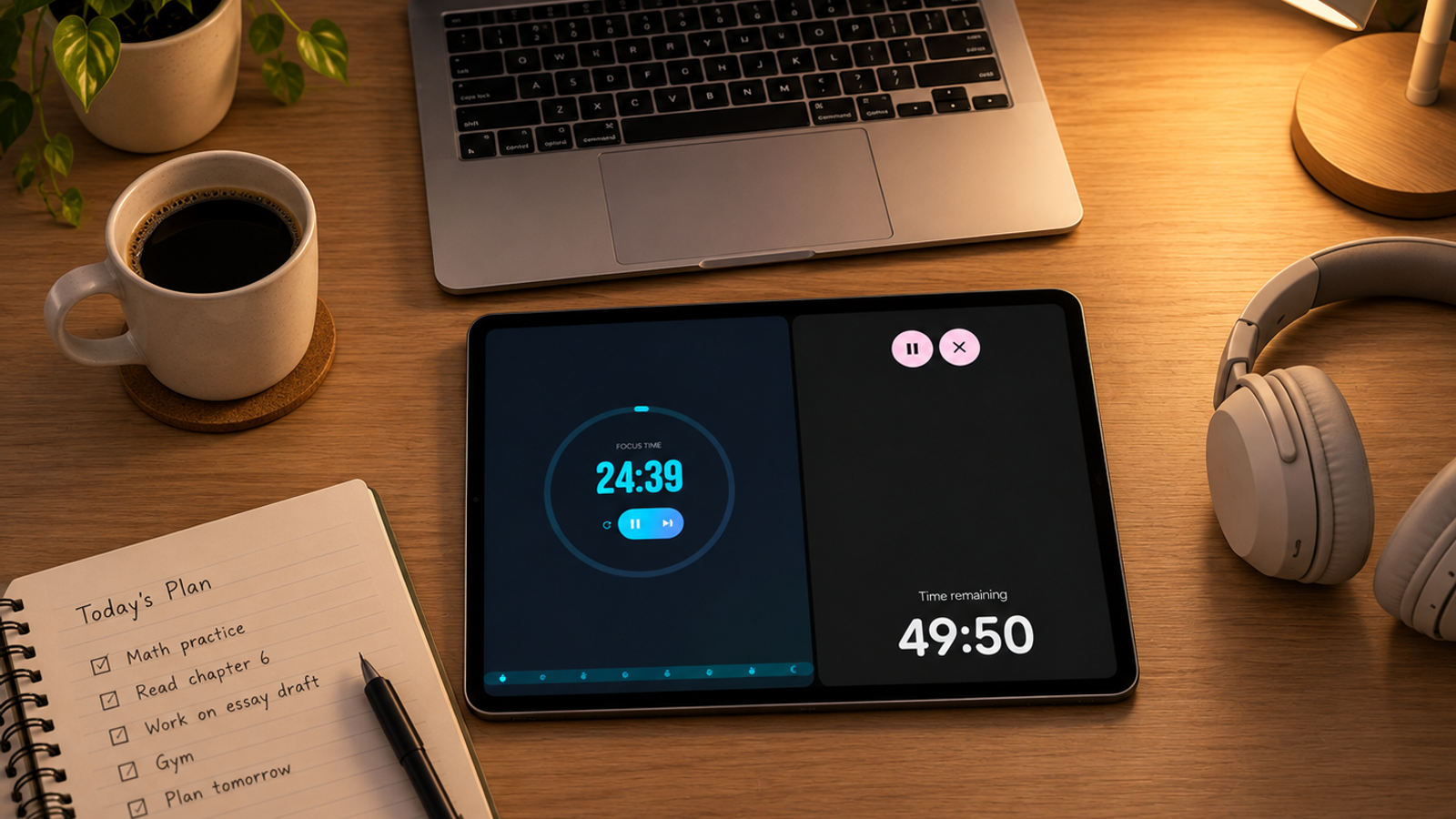
The Pomodoro widget in StandBy Mode, shown on the left above, follows that structure.
A ring counts down the current block, labeled Focus Time, while a strip at the bottom maps the whole session: four tomatoes for focus blocks, three cups for short breaks and a moon for the longer break at the end.
One glance tells you where you are in the session.
Below the timer, you can pause, skip to the next block or restart the current one.
And 25 minutes doesn’t work for everyone.
You can change the length of both focus blocks and breaks in the settings. If the timer keeps interrupting you just as you get into the work, try longer blocks before deciding Pomodoro isn’t for you.
Use Timer Duo for a Simple Study Timer
Timer Duo, shown on the right, is simpler.
It displays Time remaining in large digits, with controls to pause or cancel the countdown.
Use it when you want one defined stretch of time without a full Pomodoro cycle.
That could be:
- 50 minutes to write.
- 30 minutes to review a chapter.
- 20 minutes to answer emails.
- 10 minutes to finish one last task before a meeting.
No cycle. Just a deadline you can see.
Use Pomodoro and Timer Duo Side by Side
Pomodoro and Timer Duo answer two different questions.
Pomodoro: How long until my next break?
Timer Duo: How long until I need to stop completely?
For example, imagine you have 75 minutes before a meeting.
Timer Duo can count down those 75 minutes while Pomodoro handles the focus and break intervals inside that window.
Put both in your Duo layout and you can see both timelines without opening another app.
How to add them
- Open StandBy Mode.
- Go to Duo.
- On an empty panel, tap Add Widgets, or long-press the panel.
- Search for Pomodoro, then tap Add widget.
- Repeat on the other panel with Timer Duo.
If this is your regular study or work setup, save it as its own Space.
Then you can keep a dedicated focus setup without replacing the widgets you use at home or before bed.
To switch between Spaces, swipe left or right with three fingers. Your saved setup changes without opening a menu.
Build a Focus Setup That Works for You
There isn’t one perfect focus routine.
For some tasks, the best setup may be your phone in another room. For others, it may be a visible timer, moderate background sound and a clear stopping point.
The useful part is knowing what each tool is doing.
Use Pomodoro when you want structured work and break cycles. Use Timer Duo when you just need a countdown. Add Vibes when background sound fits the task.
And when the timer ends in the middle of something, leave yourself that two-line note before you walk away.
Have an idea for another focus widget? Tell us on UserJot. Most of the app’s screens started as user suggestions.
Turn your phone into a smart display while it charges.

About Karine Honma
My work moves between two great passions: Content Marketing and Copywriting. I’m driven by a constant desire to keep learning and by honesty in everything I do. I’m passionate about discovering the power of words and well-crafted content. I’ve collaborated with agile startups and agencies with large client portfolios. Each experience has brought me new learnings, new challenges, and a lot of satisfaction — and coffee ☕. Here you’ll get to follow a bit of my professional journey. But if you want to know who I really am — the creative, curious, and restless Karine — let’s grab a coffee, online or in person.