

Carol Azevedo
Striking Calendar is StandBy Mode's new premium Duo widget. Today's date sits large behind the month grid, in four styles, with no calendar access. Add it now.
Striking Calendar just landed in StandBy Mode. It is a premium Duo widget that puts today's date in huge type behind the month grid, so you can read it from across the room. If you saw the new calendar face in the iPhone Duo's StandBy and thought "I want that on my Android", this one is for you.
StandBy Mode is an Android app that turns a charging phone or tablet into a smart display. Striking Calendar is the newest widget in it. Wanna know more? Here we go!
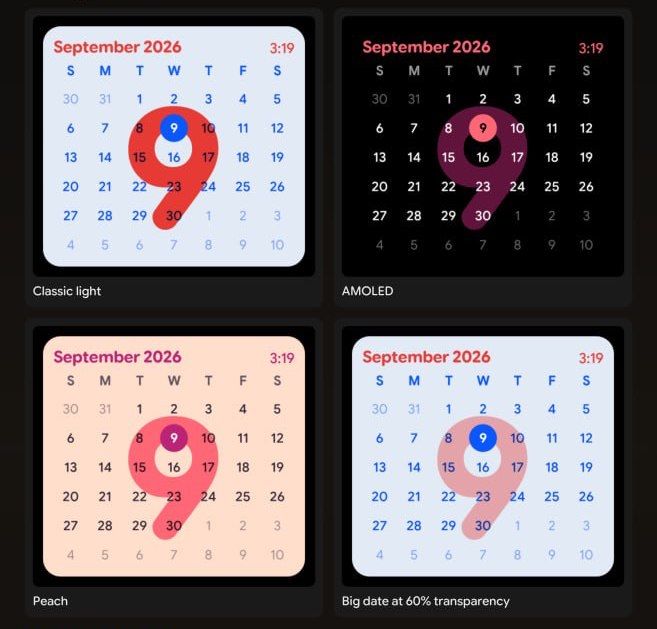
Striking Calendar is a StandBy Mode Duo widget that shows the full month grid with today's date printed large and soft behind the numbers. The month and year sit in the header, and the time can sit up there too. The result reads like a vintage wall calendar, except it lives on your phone while it charges.
It is a Duo widget, so it shares the screen with a second widget: a clock, the weather, your music player, whatever you like. On a nightstand, a desk stand or a kitchen shelf, it becomes the "what day is it" panel of your setup.
Apple's iPhone Duo (announced this September, running iOS 27) added a Calendar face to StandBy: a soft light background, the whole month laid out, and the current date in big red behind everything. It is a great piece of design. And, like every StandBy face, it only exists on iPhone.
So we built our take on it for Android. Same big-date idea, plus the things our community usually asks for: more color styles, control over how loud the big number is, and the option to keep the time in view. StandBy Mode started in 2023 inspired by iOS 17 StandBy, and this is the same spirit: bring the good ideas over, then let you customize them.
Striking Calendar lives in the Duo layout. Here's the quick version:
Here's a quick look at it in action:
Striking Calendar ships with four styles:
Then three switches that change how the widget feels:
No. Striking Calendar does not ask for calendar permission. It only needs to know today's date, which your phone already knows. Nothing from your Google Calendar or any other calendar app is read.
If you want your actual events on screen, that is a different widget. Pair Striking Calendar with Next Event Duo or Schedule Mini on the other half of the Duo layout. Those do ask for calendar access, because they need it to show your events.
Striking Calendar is a premium widget. There are two ways to get it:
Both options come with a 7-day refund policy. Try it for a week, and if it is not for you, ask for your money back. Easy.
New to StandBy Mode? Start with the full guide to StandBy Mode on Android. And if you want more than the built-in widgets in Duo, the third-party widgets tutorial shows how to drop any Android widget next to Striking Calendar.
Prop your phone up, add Striking Calendar to Duo, and never ask "what's the date today?" again.
Get StandBy Mode on Google Play
Questions about the trial, the refund, or which style to pick? Ask me in the app or e-mail me at support@zetabitapps.com. And if there's an additional style you'd love to see, drop a comment or post it on UserJot so others can vote on it.
Btw, it's Carol here. I manage StandBy Mode's socials and support. Show me your Striking Calendar setup, I'd love to see which one you liked the most :)

Carol here! I manage Support and Marketing in the StandBy Mode App for more than a year now. I love talking about the app with people, because I enjoy tech, experiments and I've watched the app grow since the begining, back when Wesley (our dev/founder) and I were just friends (now we're also neighbours, gymbros and co-workers). Feel free to talk to me about the app or maybe some tips on what to do if you come to Brazil 🇧🇷



